---
title: Patient Dashboard
description: In Billiyo Managing Skilled Care is A Breeze.
---
[Skip to content](https://knowledge.billiyo.com/knowledge/patient-dashboard-2#main-content)
English
Show submenu for translations
[![LOGO BLUE.png\]](https://knowledge.billiyo.com/hs-fs/hubfs/LOGO%20BLUE.png?height=40&name=LOGO%20BLUE.png)](https://billiyo.com/)
Open main navigation
Close main navigation
- English
Show submenu for translations
- [Portal Login](https://billiyo.com/App/security/signin.aspx)
[Portal Login](https://billiyo.com/App/security/signin.aspx)
Looking for something specific?
- There are no suggestions because the search field is empty.
1. [Help Center](https://knowledge.billiyo.com/knowledge?hsLang=en)
2. [Clients](https://knowledge.billiyo.com/knowledge/clients?hsLang=en)
3. [Patient dashboard related info](https://knowledge.billiyo.com/knowledge/clients?hsLang=en#patient-dashboard-related-info)
# Patient Dashboard
## In Billiyo Managing Skilled Care is A Breeze.
The Patient Dashboard Is where Most Skilled Care Case Management Occurs
**Navigation: CRM\>Clients\>Patient Dashboard**
Within the Patient Dashboard Lives All Functionality for Skilled Care
The Landing Page is the **Patient Profile Tab**
Here you can Edit Profile:
- Assign the **8-digit ***MA (PMI) number* Member ID (PMI)
- \*For MN agencies this is the State ID that is used for Eligibility Checking Feature in Billiyo
- Edit the Patient Profile
- Change the Patient Status
- (In order to Schedule Subsequent visits, you will need to first go to the Patient Profile and change the Patient to the Active Status)
- (In the Pending Admission Status you can schedule Assessment Visits)
- If a Patient is Transferred to an In Patient Facility you will need to place your Patient ONHOLD
For more information on placing a Patient ONHOLD please visit our Page: [Hold Status](https://knowledge.billiyo.com/knowledge/hold-status?hsLang=en)
- Set Current Payment Source for Home Health Care
- (Impacts the OASIS M0150 and NON OASIS Assessments)
- Indicate the Patient's Spoken Language and Race
- (Impacts the OASIS and NON OASIS Assessments)
- Identify Requested Services
- Identify the Source if Admission
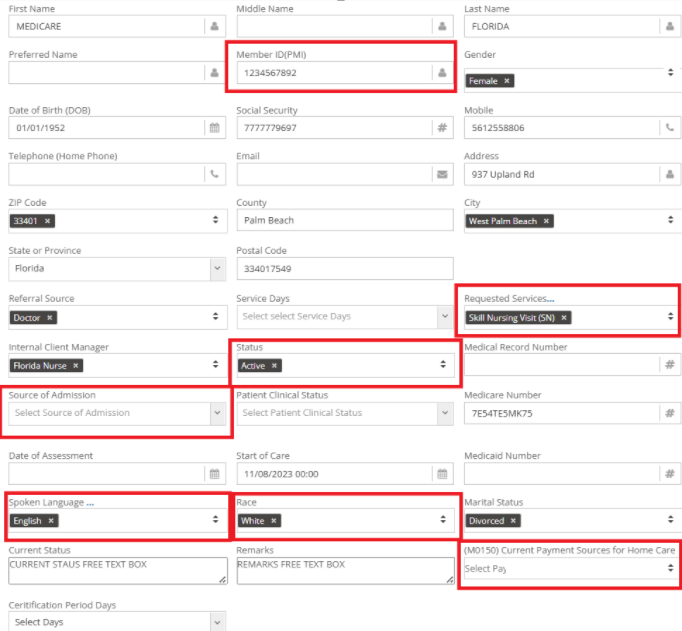
And so much More
Billiyo Also now allows Certification period and Billing period Customization
- You can Identify the Certification period and Billing period's here in the Edit Patient Profile as well
- By Default, if no selection is made, the Billiyo System will consider the Certification period and Billing period for the Patient as 60 days
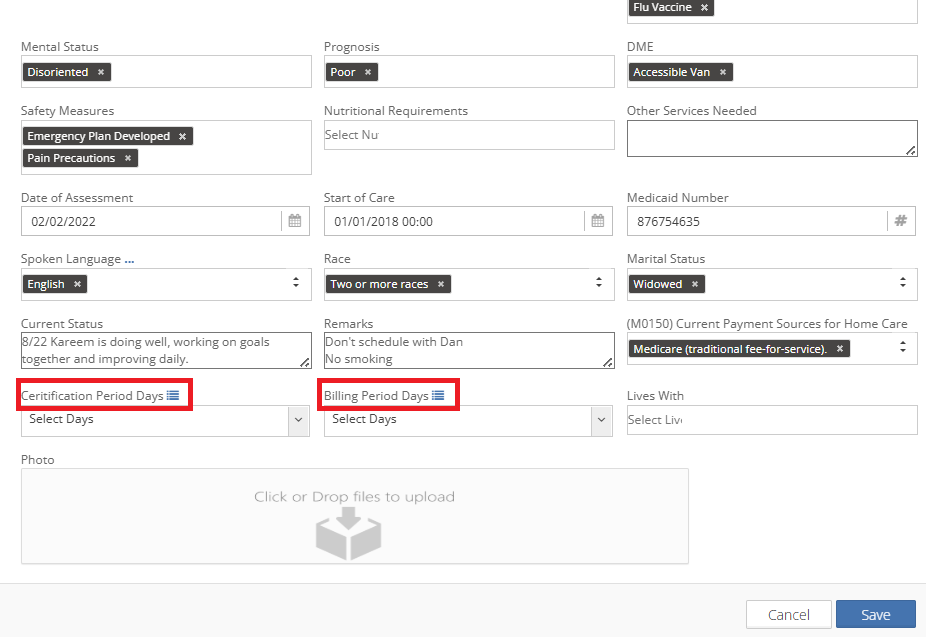
In Billiyo we have the ability to send Notifications and Emails to Remind Back Office Staff and Supervisors, Qualified Professionals, etc. that a Recertification visit is Due.
Make Sure You Save your Work at the end of your Edits.
In order to Receive these Task Notifications you will need to turn them on in Company Settings in the More Tab. If you would like to know more about Task Notifications, please reach out to your Billiyo CSM.
A great Way to Keep Track of Recertification is in the Clinical Dashboard.
For More Information on the Clinical Dashboard Please Visit Our Page: [Clinical Dashboard](https://knowledge.billiyo.com/knowledge/clinical-dasboard?hsLang=en)
Staying in the Patient Profile let's Look at other Features.
To the right of the Screen there are more Features:
**Notes**:
Here you can Add and View Notes for Staff to see both in the Caregiver and Clinical Applications as well as the Back office.
1. Click the Plus sign
2. Choose your Note Type and Type the Note in the Free Text B0x and Save
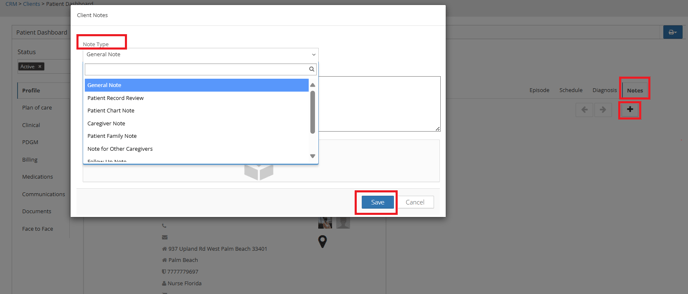
We also offer the Assign and Reorder **Diagnosis** functionality in this Page
Choose your Diagnosis Type and Start Date
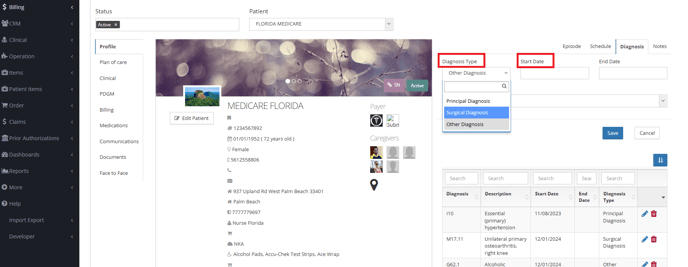Note: You can only have One Principal Diagnosis
To End Date or Edit a Diagnosis Click on the Blue Pencil Icon
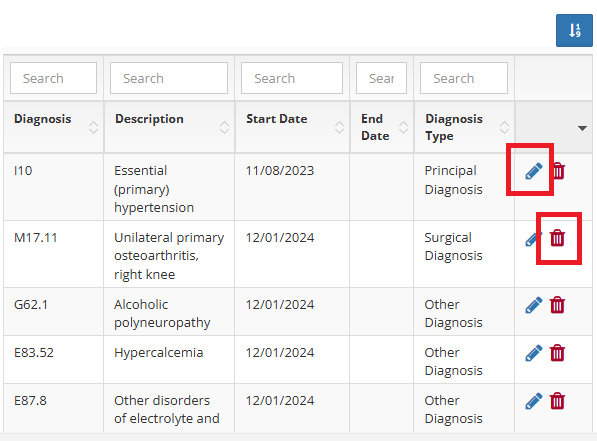
And to Delete a Diagnosis Added in Error, Click on the Red Trashcan
To Reorder the Diagnosis:
1. Click the Filter Icon
2. Drag and Drop to Rearrange the Sequence and Make Sure to Click Update to Save your Changes
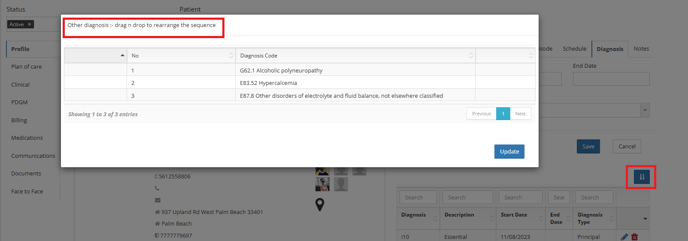
(Note: These Changes Impact the OASIS and NON OASIS Assessments)
The **Schedule Tab** in this Page is View Only and has no Functionality at this time
It is a Quick Resource for you to View the Clients Schedule without having to go to the Scheduling Page and Filter for your Patient
- Able to be Viewed By the Month or By the Week
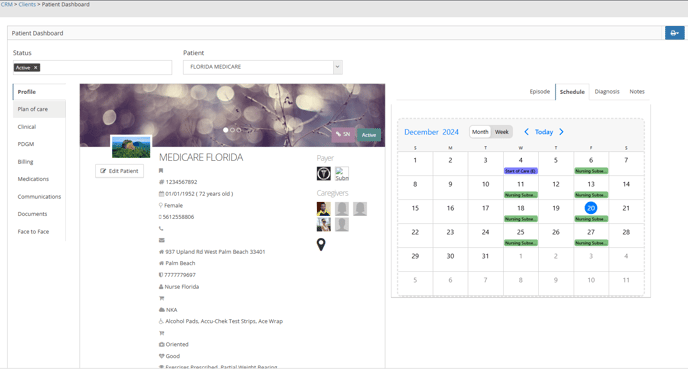
Also on the Right Hand Side of the Screen we have the Patient's Episode Details Displayed in the **Episode Tab**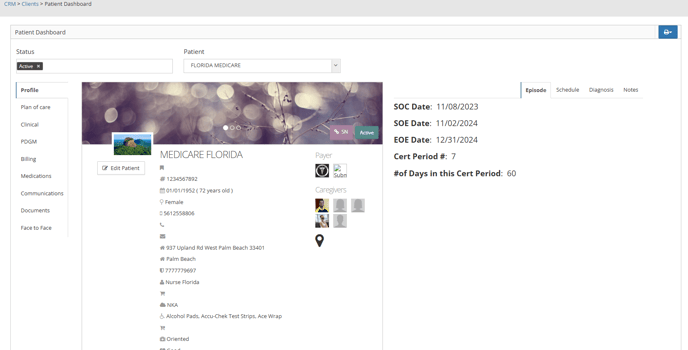
In the Bottom of this Page we have 10 additional Tabs.
**Client Contacts:**
Here are the Contacts that you entered in the Patient Onboarding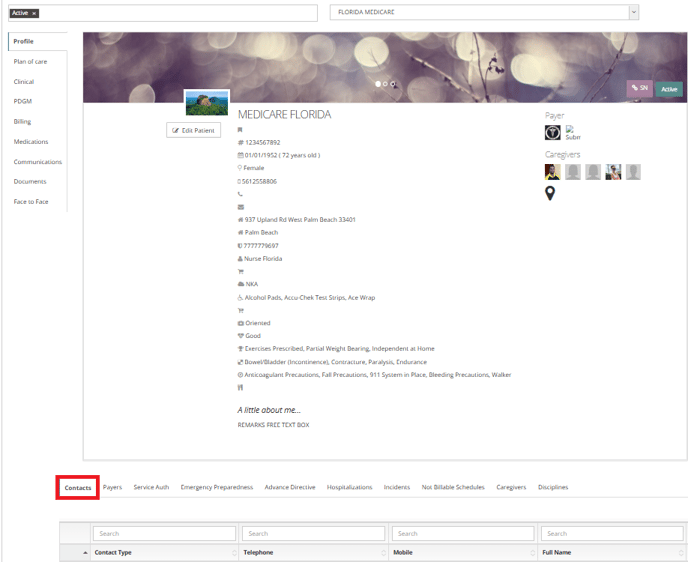
To Edit a Contact
- Click the Green Plus Sign on the Left of the Contact Type

This Will Open the Page to Edit the Contact By Clicking on the Blue Pencil Icon
If the Contact Type is Physician you will also have the Option to In Activate them
For Other Contact Types You have the Option to Delete them
And to Add a New Contact
- Click on the Gray Plus Sign in the Right Side of the Screen

The Next Tab in the Bottom of the Page is the **Payers** Tab
Here is where the Payer Information that you entered in Patient Onboarding Will Land.
This Tab has the Same Add and Edit Functionality as the **Contact** Tab
You also have the Ability to Mark a Payer as Primary and Secondary by Choosing the Edit Function

In the **Service Authorization** Tab you will see all of the SA that was entered for the Patient in the **Service Auths** Page
By Clicking on the Green Plus sign you can open the visible Details of the SA but no Edits can be made here 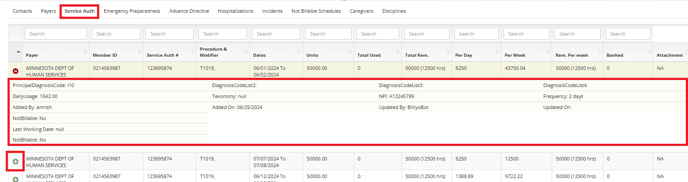
To Learn More about the Add/View SA Page, please visit our Help Center Article: [Add/View SA](https://knowledge.billiyo.com/knowledge/add-view-sa?hsLang=en)
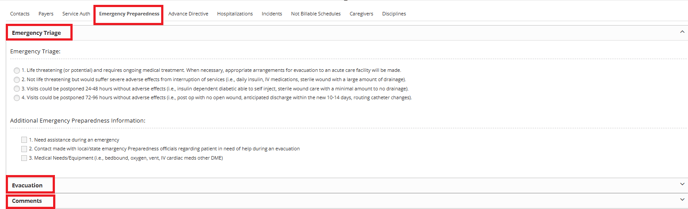
In the **Emergency Preparedness** Tab you have the ability to Add Important Information for:
- Emergency Triage
- Evacuation
- Comments
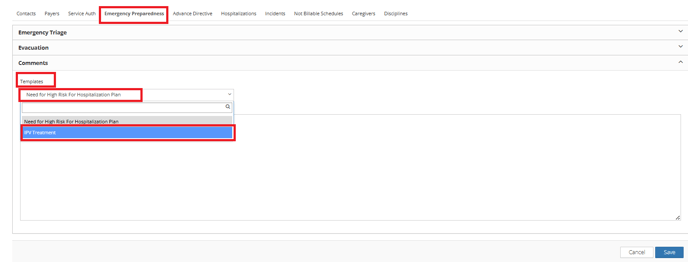
For Comments we have tw0 Templates available in Billiyo:
- The Need fir High Risk Hospitalization Plan
- Here is where you would Document things like a Patient needing to be placed in the Hospital in the event of a Disaster Due to being on Life Sustaining Medical Equipment that requires the Use of Electricity, For Example
- IPV Treatment
- Intimate Partner Violence
The Next Tab available is the **Advance Directives** Tab

For More Information on this Tab, Please Visit Our Page: [Advanced Directives (Patient Dashboard)](https://knowledge.billiyo.com/knowledge/advanced-directives?hsLang=en)
Moving on we have the **Hospitalizations** Tab
Here you can View Hospitalizations and Add Hospitalizations
To Add A Hospitalization for your patient Click on the Add Hospitalization Tab from within the Hospitalization Tab
Here you can add the details for the Patient Hospital Admission and When they are Discharged back to Home and expecting a Resumption of Care, you can come back and Add the Discharge attachments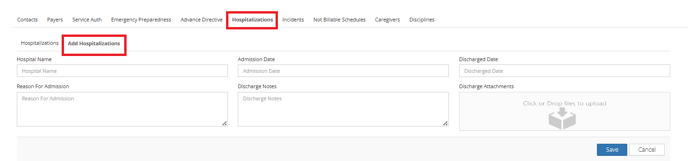To Update the information of the Hospitalization click the Blue Pencil Icon
To Delete the information, if entered in Error, Click on the Red Trashcan
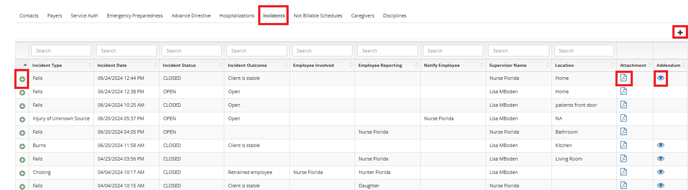
On to the **Incident** Reports Tab
In Billiyo, All Users can Report an Incident
This includes Back Office Personal, Caregivers using the Care Giver Application and Clinical Application Users
No Matter Who made the Report, they all land here
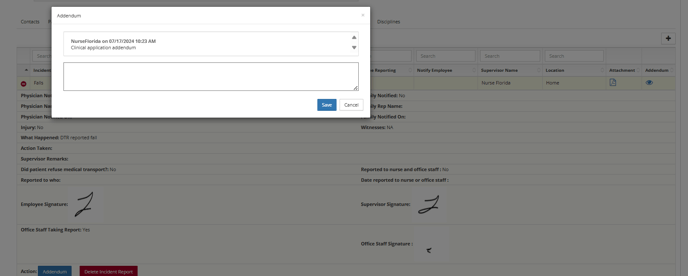
Here is where a Back Office User can Add and Incident Report or Add an Addendum to An Existing Incident Report
View the PDF of an Incident Report, View an Addendum made to an Incident Report and Delete and Incident Report
When an Incident Report is Created either in the Back Office our in one of the Billiyo Mobile Applications, Billiyo has the Ability to Notify Users of the Incident and Trigger them to Sign the Incident report or Acknowledge it.
In order to Receive these Task Notifications you will need to turn them on in Company Settings in the More Tab. If you would like to know more about Task Notifications, please reach out to your Billiyo CSM.
If a Schedule has been Cancelled or Marked as Non Billable it will be able to be seen in the Not **Billable Schedules** Tab

Here you can Edit the Reason for the Non Billable Schedule, Delete it or Add a Non Billable Schedule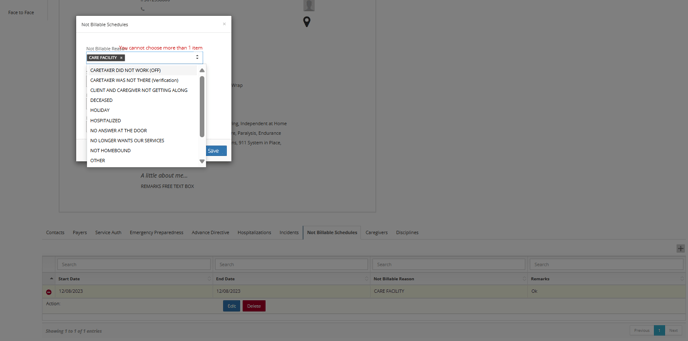
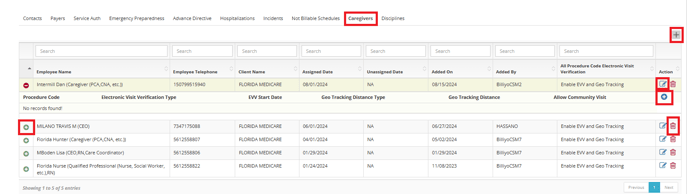
In The **Caregivers** Tab
You can:
- Add a Client Caregiver Connection
- Edit a Client Caregiver Connection
- View the Details of a Client Caregiver Connection and Delete the Caregiver Connection From the Patient
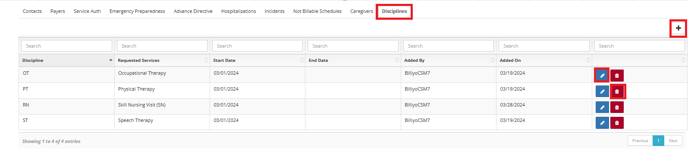
The **Disciplines** Tab is where you will add all of the Disciplines to the Patient that the Doctor has ordered
You also have the ability to Edit and Delete the Disciplines in this Tab
- [Getting Started](https://knowledge.billiyo.com/knowledge/getting-started?hsLang=en#main-content)
- [Onboarding trainings](https://knowledge.billiyo.com/knowledge/getting-started?hsLang=en#onboarding-trainings)
- [Clients](https://knowledge.billiyo.com/knowledge/clients?hsLang=en#main-content)
- [Profile related info](https://knowledge.billiyo.com/knowledge/clients?hsLang=en#profile-related-info)
- [Patient onboarding](https://knowledge.billiyo.com/knowledge/clients?hsLang=en#patient-onboarding)
- [Patient dashboard related info](https://knowledge.billiyo.com/knowledge/clients?hsLang=en#patient-dashboard-related-info)
- [Caregiver connection info](https://knowledge.billiyo.com/knowledge/clients?hsLang=en#caregiver-connection-info)
- [Service authorization info](https://knowledge.billiyo.com/knowledge/clients?hsLang=en#service-authorization-info)
- [Care plan info](https://knowledge.billiyo.com/knowledge/clients?hsLang=en#care-plan-info)
- [Recalibrate client location](https://knowledge.billiyo.com/knowledge/clients?hsLang=en#recalibrate-client-location)
- [User accounts & client portal](https://knowledge.billiyo.com/knowledge/clients?hsLang=en#user-accounts-client-portal)
- [Client eligibility](https://knowledge.billiyo.com/knowledge/clients?hsLang=en#client-eligibility)
- [Q and A](https://knowledge.billiyo.com/knowledge/clients?hsLang=en#q-and-a)
- [Deleting Client Documents](https://knowledge.billiyo.com/knowledge/clients?hsLang=en#deleting-client-documents)
- [Services Tab](https://knowledge.billiyo.com/knowledge/clients?hsLang=en#services-tab)
- [Client Onboarding Application](https://knowledge.billiyo.com/knowledge/clients?hsLang=en#client-onboarding-application)
- [Employee](https://knowledge.billiyo.com/knowledge/employee?hsLang=en#main-content)
- [Profile related items](https://knowledge.billiyo.com/knowledge/employee?hsLang=en#profile-related-items)
- [User account info](https://knowledge.billiyo.com/knowledge/employee?hsLang=en#user-account-info)
- [Payroll info](https://knowledge.billiyo.com/knowledge/employee?hsLang=en#payroll-info)
- [Employee Hours Summary](https://knowledge.billiyo.com/knowledge/employee?hsLang=en#employee-hours-summary)
- [Expense info](https://knowledge.billiyo.com/knowledge/employee?hsLang=en#expense-info)
- [Request app user's location](https://knowledge.billiyo.com/knowledge/employee?hsLang=en#request-app-users-location)
- [Caregiver app info](https://knowledge.billiyo.com/knowledge/employee?hsLang=en#caregiver-app-info)
- [Clinical app info](https://knowledge.billiyo.com/knowledge/employee?hsLang=en#clinical-app-info)
- [Telephony](https://knowledge.billiyo.com/knowledge/employee?hsLang=en#telephony)
- [Caregiver dashboard](https://knowledge.billiyo.com/knowledge/employee?hsLang=en#caregiver-dashboard)
- [Employee onboarding URL](https://knowledge.billiyo.com/knowledge/employee?hsLang=en#employee-onboarding-url)
- [Q and A](https://knowledge.billiyo.com/knowledge/employee?hsLang=en#q-and-a)
- [Mobile apps](https://knowledge.billiyo.com/knowledge/employee?hsLang=en#mobile-apps)
- [Deleting Employee Documents](https://knowledge.billiyo.com/knowledge/employee?hsLang=en#deleting-employee-documents)
- [Employee Services Tracking](https://knowledge.billiyo.com/knowledge/employee?hsLang=en#employee-services-tracking)
- [Reset Password](https://knowledge.billiyo.com/knowledge/employee?hsLang=en#reset-password)
- [Scheduling & Timesheets](https://knowledge.billiyo.com/knowledge/scheduling-timesheets?hsLang=en#main-content)
- [Scheduling related info](https://knowledge.billiyo.com/knowledge/scheduling-timesheets?hsLang=en#scheduling-related-info)
- [Schedules approval related info](https://knowledge.billiyo.com/knowledge/scheduling-timesheets?hsLang=en#schedules-approval-related-info)
- [Electronic timesheet info](https://knowledge.billiyo.com/knowledge/scheduling-timesheets?hsLang=en#electronic-timesheet-info)
- [Manual timesheet Info](https://knowledge.billiyo.com/knowledge/scheduling-timesheets?hsLang=en#manual-timesheet-info)
- [Manual clock in/out info](https://knowledge.billiyo.com/knowledge/scheduling-timesheets?hsLang=en#manual-clock-in-out-info)
- [Q and A](https://knowledge.billiyo.com/knowledge/scheduling-timesheets?hsLang=en#q-and-a)
- [Clinical & Documentation](https://knowledge.billiyo.com/knowledge/clinical-documentation?hsLang=en#main-content)
- [Service verification](https://knowledge.billiyo.com/knowledge/clinical-documentation?hsLang=en#service-verification)
- [Clinical forms info](https://knowledge.billiyo.com/knowledge/clinical-documentation?hsLang=en#clinical-forms-info)
- [Nursing visit](https://knowledge.billiyo.com/knowledge/clinical-documentation?hsLang=en#nursing-visit)
- [PDN info](https://knowledge.billiyo.com/knowledge/clinical-documentation?hsLang=en#pdn-info)
- [Progress note](https://knowledge.billiyo.com/knowledge/clinical-documentation?hsLang=en#progress-note)
- [Vitals log](https://knowledge.billiyo.com/knowledge/clinical-documentation?hsLang=en#vitals-log)
- [Health analysis](https://knowledge.billiyo.com/knowledge/clinical-documentation?hsLang=en#health-analysis)
- [eMar info](https://knowledge.billiyo.com/knowledge/clinical-documentation?hsLang=en#emar-info)
- [OASIS submissions](https://knowledge.billiyo.com/knowledge/clinical-documentation?hsLang=en#oasis-submissions)
- [Skilled patient task flow](https://knowledge.billiyo.com/knowledge/clinical-documentation?hsLang=en#skilled-patient-task-flow)
- [QA QI info](https://knowledge.billiyo.com/knowledge/clinical-documentation?hsLang=en#qa-qi-info)
- [Patient Dashboard](https://knowledge.billiyo.com/knowledge/clinical-documentation?hsLang=en#patient-dashboard)
- [Physician orders](https://knowledge.billiyo.com/knowledge/clinical-documentation?hsLang=en#physician-orders)
- [Upload documents info](https://knowledge.billiyo.com/knowledge/clinical-documentation?hsLang=en#upload-documents-info)
- [QP visit documentation](https://knowledge.billiyo.com/knowledge/clinical-documentation?hsLang=en#qp-visit-documentation)
- [Digitalized documents info](https://knowledge.billiyo.com/knowledge/clinical-documentation?hsLang=en#digitalized-documents-info)
- [Q and A](https://knowledge.billiyo.com/knowledge/clinical-documentation?hsLang=en#q-and-a)
- [Medication](https://knowledge.billiyo.com/knowledge/clinical-documentation?hsLang=en#medication)
- [Claims & Invoices](https://knowledge.billiyo.com/knowledge/claims-invoices?hsLang=en#main-content)
- [Claim related info](https://knowledge.billiyo.com/knowledge/claims-invoices?hsLang=en#claim-related-info)
- [Invoice related info](https://knowledge.billiyo.com/knowledge/claims-invoices?hsLang=en#invoice-related-info)
- [EVV claim related info](https://knowledge.billiyo.com/knowledge/claims-invoices?hsLang=en#evv-claim-related-info)
- [Claim Detail Report info](https://knowledge.billiyo.com/knowledge/claims-invoices?hsLang=en#claim-detail-report-info)
- [Denial Analysis Report info](https://knowledge.billiyo.com/knowledge/claims-invoices?hsLang=en#denial-analysis-report-info)
- [Electronic Remittance info](https://knowledge.billiyo.com/knowledge/claims-invoices?hsLang=en#electronic-remittance-info)
- [Q and A](https://knowledge.billiyo.com/knowledge/claims-invoices?hsLang=en#q-and-a)
- [Service Verification Failed](https://knowledge.billiyo.com/knowledge/claims-invoices?hsLang=en#service-verification-failed)
- [Reporting](https://knowledge.billiyo.com/knowledge/reporting?hsLang=en#main-content)
- [Dashboards info (excluding "Caregiver Dashboard")](https://knowledge.billiyo.com/knowledge/reporting?hsLang=en#dashboards-info-excluding-caregiver-dashboard)
- [Contact Masters](https://knowledge.billiyo.com/knowledge/reporting?hsLang=en#contact-masters)
- [ServiceAuth](https://knowledge.billiyo.com/knowledge/reporting?hsLang=en#serviceauth)
- [LEIE](https://knowledge.billiyo.com/knowledge/reporting?hsLang=en#leie)
- [Balance And Aging](https://knowledge.billiyo.com/knowledge/reporting?hsLang=en#balance-and-aging)
- [Batch Detail](https://knowledge.billiyo.com/knowledge/reporting?hsLang=en#batch-detail)
- [Late/Missed Schedule](https://knowledge.billiyo.com/knowledge/reporting?hsLang=en#late-missed-schedule)
- [Dynamic Report](https://knowledge.billiyo.com/knowledge/reporting?hsLang=en#dynamic-report)
- [Cost Report](https://knowledge.billiyo.com/knowledge/reporting?hsLang=en#cost-report)
- [Financial Reports](https://knowledge.billiyo.com/knowledge/reporting?hsLang=en#financial-reports)
- [Q and A](https://knowledge.billiyo.com/knowledge/reporting?hsLang=en#q-and-a)
- [Download Documents](https://knowledge.billiyo.com/knowledge/reporting?hsLang=en#download-documents)
- [Settings & Setup](https://knowledge.billiyo.com/knowledge/settings-setup?hsLang=en#main-content)
- [Billiyo subscription info](https://knowledge.billiyo.com/knowledge/settings-setup?hsLang=en#billiyo-subscription-info)
- [Company settings info](https://knowledge.billiyo.com/knowledge/settings-setup?hsLang=en#company-settings-info)
- [Surveyor user account info](https://knowledge.billiyo.com/knowledge/settings-setup?hsLang=en#surveyor-user-account-info)
- [Service type management info](https://knowledge.billiyo.com/knowledge/settings-setup?hsLang=en#service-type-management-info)
- [Q and A](https://knowledge.billiyo.com/knowledge/settings-setup?hsLang=en#q-and-a)
- [Basic Company Information](https://knowledge.billiyo.com/knowledge/settings-setup?hsLang=en#basic-company-information)
- [Communication & Tasks](https://knowledge.billiyo.com/knowledge/communication-tasks?hsLang=en#main-content)
- [Chat](https://knowledge.billiyo.com/knowledge/communication-tasks?hsLang=en#chat)
- [Tasks](https://knowledge.billiyo.com/knowledge/communication-tasks?hsLang=en#tasks)
- [Mass communications](https://knowledge.billiyo.com/knowledge/communication-tasks?hsLang=en#mass-communications)
- [Reconciling eFax](https://knowledge.billiyo.com/knowledge/communication-tasks?hsLang=en#reconciling-efax)
- [View Fax](https://knowledge.billiyo.com/knowledge/communication-tasks?hsLang=en#view-fax)
- [Patient Dashboard Communications](https://knowledge.billiyo.com/knowledge/communication-tasks?hsLang=en#patient-dashboard-communications)
- [Employee Communications](https://knowledge.billiyo.com/knowledge/communication-tasks?hsLang=en#employee-communications)
- [Product Updates](https://knowledge.billiyo.com/knowledge/product-updates?hsLang=en#main-content)
- [Product updates](https://knowledge.billiyo.com/knowledge/product-updates?hsLang=en#product-updates)
- [Electronic Visit Verification (EVV)](https://knowledge.billiyo.com/knowledge/electronic-visit-verification-evv?hsLang=en#main-content)
- [Minnesota (MN) EVV](https://knowledge.billiyo.com/knowledge/electronic-visit-verification-evv?hsLang=en#minnesota-mn-evv)
- [Review EVV](https://knowledge.billiyo.com/knowledge/electronic-visit-verification-evv?hsLang=en#review-evv)
- [More](https://knowledge.billiyo.com/knowledge/more?hsLang=en#main-content)
- [Company](https://knowledge.billiyo.com/knowledge/more?hsLang=en#company)
- [User Account](https://knowledge.billiyo.com/knowledge/more?hsLang=en#user-account)
- [Product Updates](https://knowledge.billiyo.com/knowledge/more?hsLang=en#product-updates)
- [Mobile Apps](https://knowledge.billiyo.com/knowledge/mobile-apps?hsLang=en#main-content)
- [Billiyo for Caregiver App](https://knowledge.billiyo.com/knowledge/mobile-apps?hsLang=en#billiyo-for-caregiver-app)
- [Billiyo Clinical App](https://knowledge.billiyo.com/knowledge/mobile-apps?hsLang=en#billiyo-clinical-app)
- [Billiyo for Adult Day Care App](https://knowledge.billiyo.com/knowledge/mobile-apps?hsLang=en#billiyo-for-adult-day-care-app)
- [CRM](https://knowledge.billiyo.com/knowledge/crm?hsLang=en#main-content)
- [Service Auths](https://knowledge.billiyo.com/knowledge/crm?hsLang=en#service-auths)
- [Dashboards](https://knowledge.billiyo.com/knowledge/dashboards?hsLang=en#main-content)
- [Document Hub](https://knowledge.billiyo.com/knowledge/dashboards?hsLang=en#document-hub)
- [Adult Day Care](https://knowledge.billiyo.com/knowledge/adult-day-care?hsLang=en#main-content)
- [Adult Daycare App](https://knowledge.billiyo.com/knowledge/adult-day-care?hsLang=en#adult-daycare-app)
[](http://billiyo.com)
Billiyo Help Center
Copyright © 2026, Billiyo Health Inc.