![LOGO BLUE.png]](https://knowledge.billiyo.com/hs-fs/hubfs/LOGO%20BLUE.png?height=40&name=LOGO%20BLUE.png)
In order to send and receive faxes, the agency must be signed up for our Billiyo Communications Package.
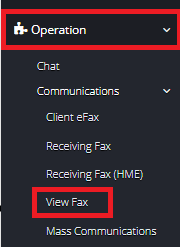
To View Faxes Head on over to Operation > Communications > View Fax
At the top of this page will be several filter fields, use these to help locate a specific fax:
-
Type
-
Client or Employee
-
-
List of Clients or Employees in Drop Down
-
Fax Status
-
Sent on
-
Contacts
-
The information that appears for selection in this field directly relates to the “Type” and “Client” or “Employee” field selections.
-
Use the  to search by your filter selections.
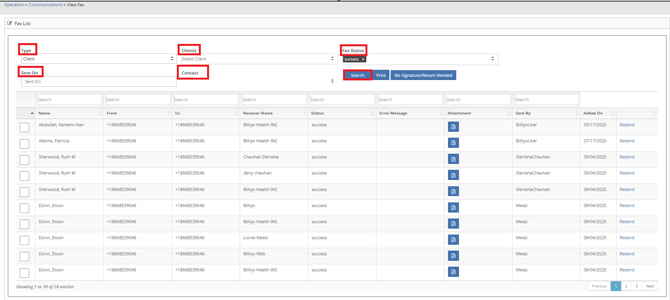
To View or Print a copy of the Fax report click on  .
.
In this page you can view the fax by clicking on the  icon.
icon.
Here you can download a copy or Print the Fax that was sent. 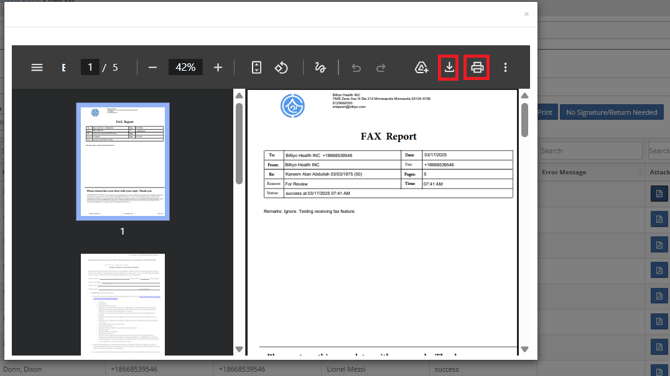
To Resend a fax click on  .
.
A Pop Up will appear where you can choose to Cancel or Resend.