![LOGO BLUE.png]](https://knowledge.billiyo.com/hs-fs/hubfs/LOGO%20BLUE.png?height=40&name=LOGO%20BLUE.png)
To prevent a user from logging into Billiyo, but without fully removing their access, we can block their account.
How to delete a user account.
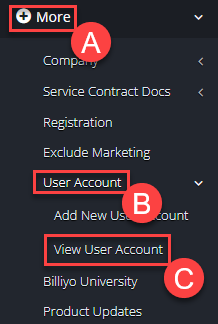
To delete an employee's user account, and remove their access to Billiyo, please navigate to the View User Account page.
Access the View User Account Page by navigating through: More > User Account > View User Account
Then, locate the employee profile that you would like to delete. After finding the correct account, please hit the green plus sign.  Then hit the red "Delete User Account" button.
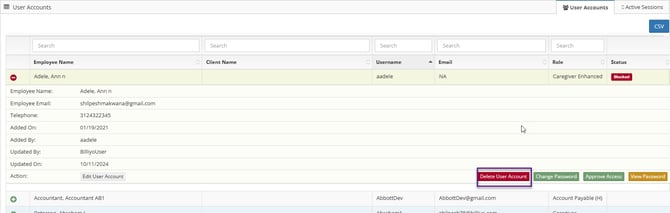
After deleting your user account, you will need to refresh your page in order for the change to take affect.
You cannot delete a super user's account.