![LOGO BLUE.png]](https://knowledge.billiyo.com/hs-fs/hubfs/LOGO%20BLUE.png?height=40&name=LOGO%20BLUE.png)
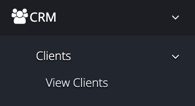
To access the mass edit function for the client caregiver connection, click here to be taken to the View Clients page or in the left menu navigate to:
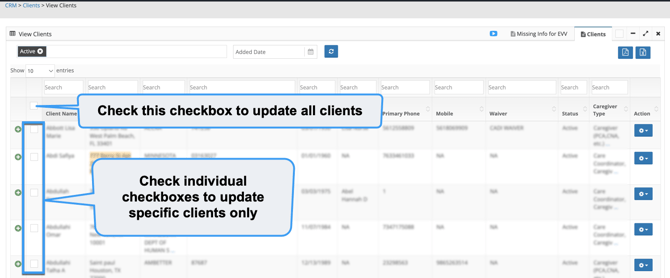
To the left of each client's name a checkbox will appear, along with a checkbox in the header row to select all.
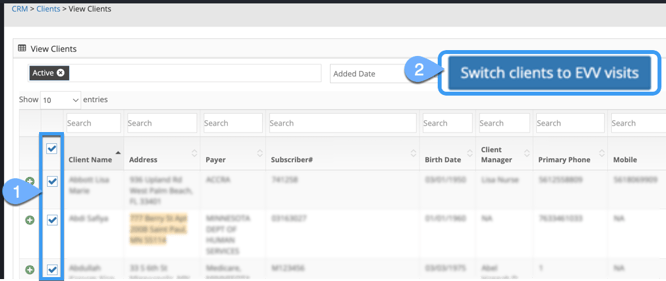
Once any checkbox is checked, a  button will appear.
When clicking on the button, a pop-up will appear where information can be updated from.
If No EVV is selected in the Electronic Visit Verification field, here's what will display: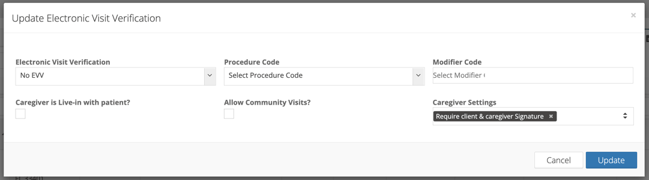
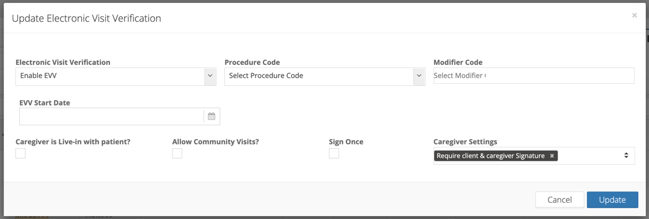
If Enable EVV or Clock In-Out No EVV are selected in the Electronic Visit Verification field, here's what will display:
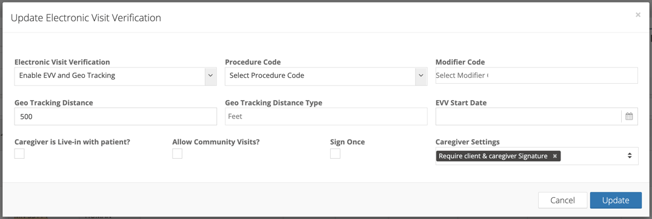
If Enable EVV and Geo Tracking or Geo Tracking are selected in the Electronic Visit Verification field, here's what will display:
Items to note
- The Procedure Code field is required to save, as this dictates what connections will be updated.
- All selection options in the Electronic Visit Verification field except No EVV, will require the EVV Start Date field to save.
- The Sign Once checkbox will only appear if sign once has been enabled for the account — learn more about this feature here.
- If the Caregiver is Live-in with patient? checkbox is not checked while performing mass edit, it will not become unchecked in connections that it was previously checked in.
Once edits have been made, click on the  button to save.