![LOGO BLUE.png]](https://knowledge.billiyo.com/hs-fs/hubfs/LOGO%20BLUE.png?height=40&name=LOGO%20BLUE.png)
There are two ways to do this:
Head on over to the Client/Patient Profile or the Caregiver Connection in CRM.
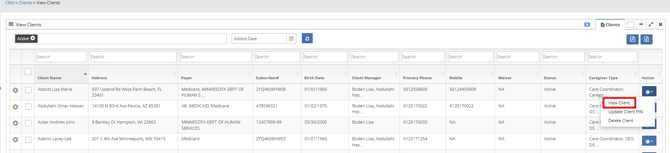
To Edit a Client Caregiver Connection in the Client Profile head on over to CRM>Clients>View Clients.
Click on the  button.
Choose View Client.
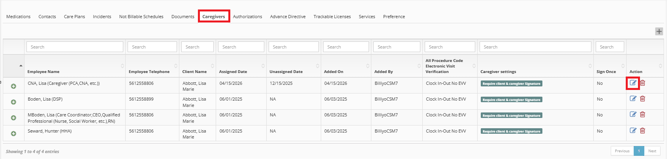
At the bottom of the client/patient profile you will see the Caregivers Tab.
Here you can click on the  .
.
A Pop Up will appear.
Male your edits and click on  .
.
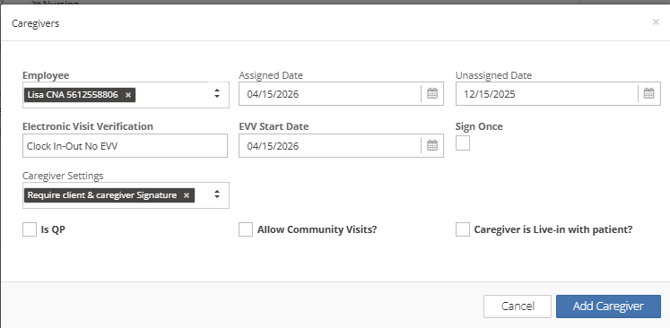
You will not be able to make edits to
- Client
- Employee
- QP
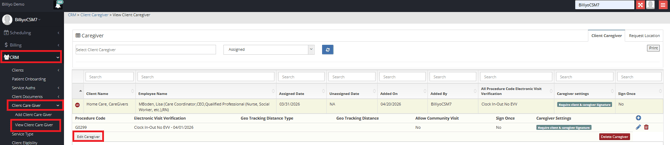
To Edit a Client Caregiver Connection in the Client Caregiver Page head on over to CRM>Client Caregiver>View Client Caregiver.
Click on the  .
.
Once you click on the  the client caregiver connection will expand for more options.
To Edit the overarching client caregiver connection click on  .
.
A page will open where you can make edits.
Don't forget to click on  .
.
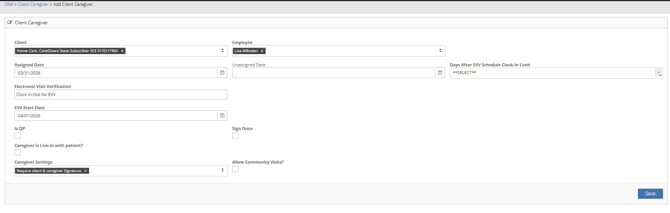
By default, the changes you make to the overarching connection will apply to your procedure code connections as well.
To only change the overarching connection, please deselect the "Apply change to procedure code set ups" fields: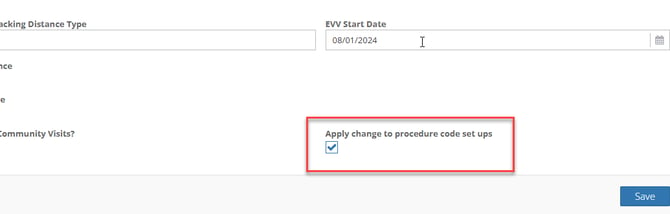
If not all procedure codes and modifiers allow for community visits, you could use this customization to allow community visits for specific procedure codes and modifiers only.
To make edits at the procedure code level click on the  .
.

A page will open where you can make edits.
Don't forget to click on .
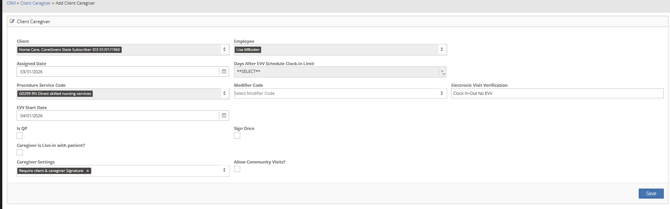
Repeat this process for each procedure code and modifier(s) that need different settings.