![LOGO BLUE.png]](https://knowledge.billiyo.com/hs-fs/hubfs/LOGO%20BLUE.png?height=40&name=LOGO%20BLUE.png)
Accessible to all:
Document Grouping.
With Document Grouping you have the control of creating groups of documents or single documents to be auto generated based on intervals of care.
To get started head to the Document Hub in Dashboards.
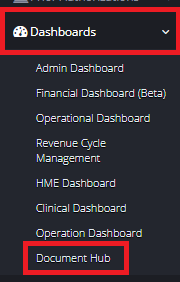
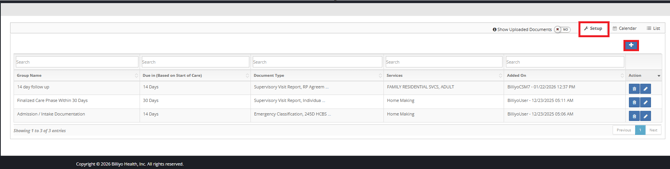
To get started click on the  .
. 
Here you will choose:
-
Set up for Employee
-
Document grouping name- a free text field
-
Employee Job Title- based on the Job Title in the Employee Profile
-
Due in (Based on Hire Date)- this is when your document is generated
-
Automatically generate the following documents that need to be completed
-
A Multi select list of documents to be generated
-
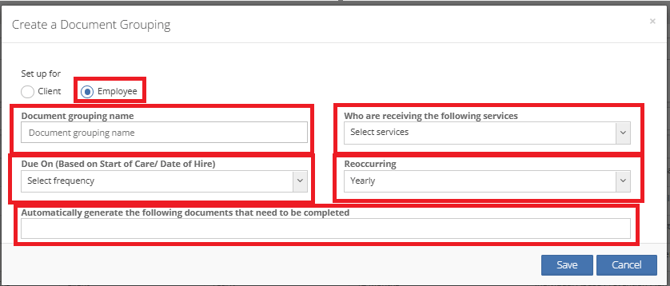
Once you have selected all the appropriate fields don't forget to hit  .
.
Once you hit  , you are all set. The Documents you have chosen will generate based on the frequency that you have selected to the employees who have the job title you have selected.
Your Caregiver will have the documents available to them in the employee documents Tab in the more Page of the Caregiver Mobile application.