![LOGO BLUE.png]](https://knowledge.billiyo.com/hs-fs/hubfs/LOGO%20BLUE.png?height=40&name=LOGO%20BLUE.png)
There are two ways to do this:
Head on over to the Client/Patient Profile or the Caregiver Connection in CRM.
To Delete a Client Caregiver Connection in the Client Profile head on over to CRM>Clients>View Clients.
Click on the  button.
Choose View Client.
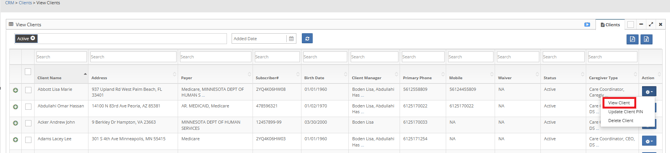
If the Client and Caregiver worked together, this is not the step to take. To view the article on Ending a Client Caregiver Connection Click here.
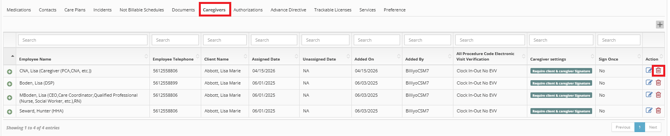
At the bottom of the client/patient profile you will see the Caregivers Tab.
Here you can click on the  .
.
On the confirmation pop-up that appears, click on the Delete button to delete the client caregiver connection.
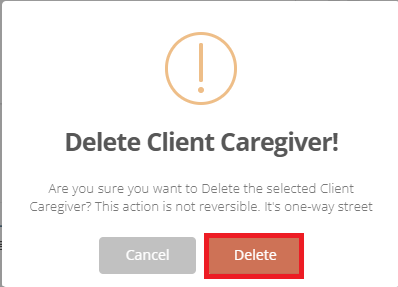
Once you take this step, the Caregiver Connection will be deleted and cannot be restored.
To Delete a Client Caregiver Connection in the Client Caregiver head on over to CRM>Client Caregiver>View Client Caregiver.
Click on the  to expand for more options.
Once the client caregiver is expanded click on the Delete Caregiver Button.

If the Client and Caregiver worked together, this is not the step to take. To View the article on Ending a Client Caregiver Connection Click Here.
On the confirmation pop-up that appears, click on the Delete button to delete the client caregiver connection.
Once you take this step, the Caregiver Connection will be deleted and cannot be restored.